
Adding Outside Accounts to Beckham Financial Portal
You can link outside accounts to your Beckham Financial client portal, giving us a more complete view of your overall financial picture in one place.
Common outside accounts that Clients can add:
Employer-sponsored Retirement Plans (401k, 403b, etc.)
Outside Retirement Accounts
Outside Brokerage Accounts
529 College Savings Plans
Bank Accounts
Fixed and Variable Annuities
Some Crytocurrency and Digital Assets
Step 1: Log in to the Client Portal at www.advyzon.com (Must Select Client Login)

Step 2: Go to Profile and select the Synced Accounts tab
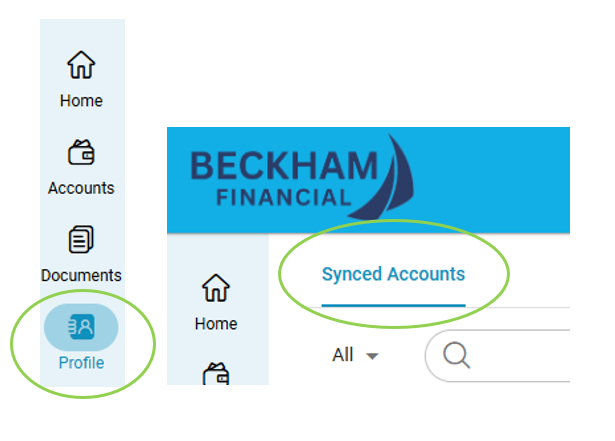
Step 3: Click Actions > Link Account from ByAllAccounts

Step 4: Choose the account holder and search for the financial institution by name or URL
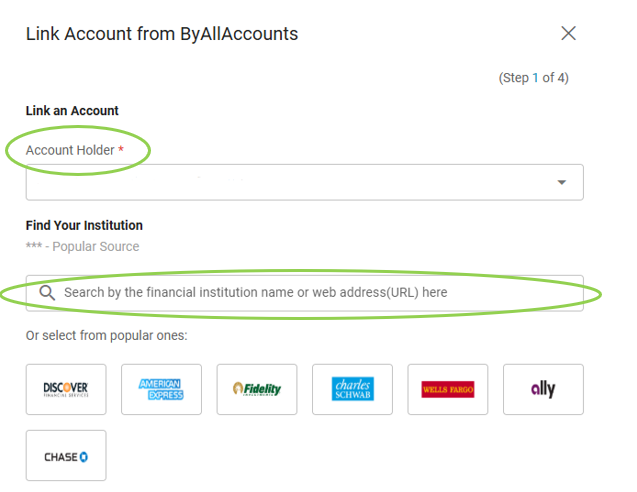
Step 5: Click Next to proceed to the institution's login page
Step 6: Accept any Terms & Conditions and enter your login credentials
Step 7: If prompted, complete any required security steps
Step 8: Select the accounts to be aggregated and click Save